Compress Image to 1MB
Keep high-resolution photos, iPhone HEIC captures, and document scans strictly under 1 MB (1,024 KB / 1,048,576 bytes) locally in your browser with minimal quality loss.
Shrinking 5MB–20MB Camera Photos Under 1MB Without Visible Loss
Modern smartphone and mirrorless cameras routinely output 4 MB to 18 MB image files—well above the 1 MB attachment cap enforced by many HR portals, banking document uploaders, property management forms, email marketing tools, and CMS media libraries.
With a 1 MB ceiling (1,024 KB = 1,048,576 bytes in binary MiB, or 1,000,000 bytes in decimal MB), KBLimit can typically preserve full high-resolution pixel dimensions at crisp 80%–94% quality. The binary search avoids unnecessary degradation by checking top quality first and only stepping quality down to the exact point where the image fits under 1,048,576 bytes.
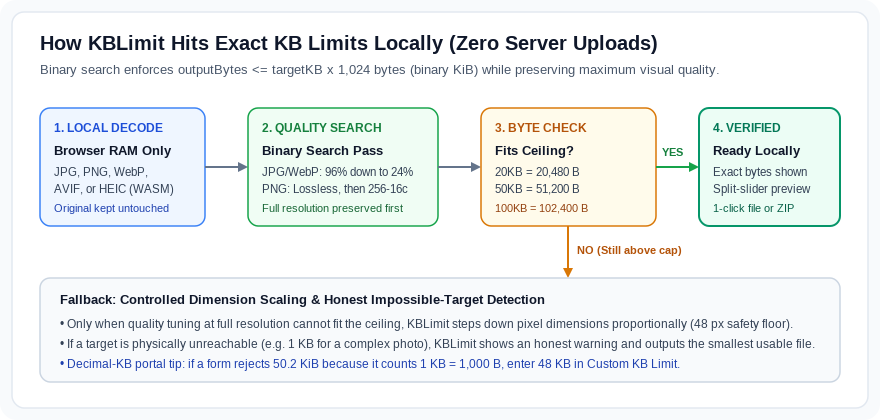
- Binary MiB (1,048,576 B) vs. decimal MB (1,000,000 B): KBLimit’s 1 MB preset targets 1,024 KB (1,048,576 bytes) and displays exact output bytes on every card. If a strict portal enforces decimal 1,000,000 bytes, enter 976 KB (999,424 B) in the custom KB field.
- Works directly on iPhone HEIC photos: drop .heic files directly without pre-converting—KBLimit decodes locally via self-hosted libheif WebAssembly and compresses under 1 MB in a single step.
- Respects transparent PNGs: Auto mode keeps PNG transparency intact rather than converting every upload to JPG. For huge photographic PNGs (e.g., 15 MB desktop screenshots), switching Output Format to WebP or JPG often fits under 1 MB at full resolution without color banding.
- Continue in RAM: after compressing under 1 MB, hand your image straight to Image to PDF, Crop, Resize, or JPG to WebP without saving intermediate files.
When to Resize & Privacy Guarantees for Sensitive Documents
Most 12-megapixel photos fit comfortably under 1 MB without resizing. However, if you are compressing huge 40–48 MP camera files or dense high-DPI PNG scans, resizing to 2400–3000 px on the longest side first keeps text and fine lines cleaner than forcing low quality at massive dimensions.
Because tax forms, bank statements, contracts, and medical scans frequently hit 1 MB upload limits, KBLimit processes every byte strictly inside your browser tab’s local RAM—with zero server uploads, zero cloud retention, and zero tracking.
Frequently Asked Questions
Is 1MB equal to 1,000 KB or 1,024 KB in KBLimit?
KBLimit uses binary units (1 MB = 1,024 KB = 1,048,576 bytes, technically 1 MiB) and prints exact output bytes on every card. If an upload portal enforces decimal 1,000,000 bytes, enter 976 KB (999,424 B) in the Custom KB input.
Will compressing to 1MB noticeably degrade my photograph?
For typical smartphone and web photos, 1 MB is generous enough that KBLimit usually preserves full dimensions at 82%–94% quality—virtually indistinguishable to the naked eye. Use the Split-Slider Preview modal to verify sharpness before downloading.
What happens if my image is already smaller than 1MB?
KBLimit detects that the image already fits under the 1,048,576-byte ceiling at top quality and reports the exact original and output sizes honestly without unnecessary quality reduction.
Why did my large transparent PNG need palette quantization or downscaling at 1MB?
Lossless 24/32-bit PNG stores uncompressed-style pixel entropy via DEFLATE, so photographic PNGs can weigh 8–20 MB. KBLimit preserves transparency in PNG Auto mode; if you do not need transparency, switching Output Format to JPG or WebP lets high-resolution photos fit under 1 MB effortlessly.
Are my documents or high-res photos uploaded to any server?
No. Everything runs 100% locally in your browser’s memory with zero network uploads.