Compress Image to 500KB
Shrink large photos, e-commerce product shots, and scanned documents under 500 KB (512,000 bytes) locally in your browser while preserving full resolution wherever possible.
Preserving Crisp Resolution Under a 500KB Upload Ceiling
500 KB (512,000 bytes in binary KiB, or 500,000 bytes in decimal KB) is the sweet spot for high-clarity web and document uploads: Shopify and Etsy product listings, real-estate MLS galleries, WordPress blog hero images, job-portal resume attachments, and insurance claim photographs.
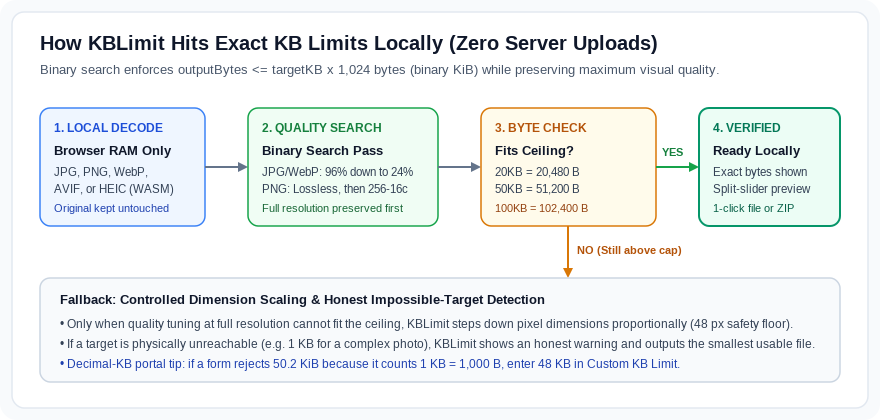
Unlike ultra-tight 10 KB–50 KB caps, a 500 KB budget lets most 1600–2500 px photographs keep their full pixel dimensions at high visual quality (often 75%–90% JPEG or WebP quality) without any downscaling. KBLimit’s binary search tests top quality first and converges on the highest quality level that fits strictly under 512,000 bytes.
- Best formats at 500 KB: JPG for universal CMS/portal compatibility, WebP for noticeably sharper web hero images at the same byte budget, and PNG (Auto) for UI screenshots or transparent product cutouts.
- When resizing helps: if you start from a 48-megapixel DSLR or smartphone RAW-exported photo (10+ MB), resizing to 2000–2400 px wide first on KBLimit’s Resize Image page produces sharper detail under 500 KB than compressing a huge 8000 px frame.
- Decimal KB vs. binary KiB: KBLimit enforces 500 × 1,024 = 512,000 bytes. For a strict 500,000-byte decimal upload validator, enter 488 KB (499,712 B) in the custom KB field and confirm the exact byte readout.
- Batch ZIP & RAM Handoff: drop dozens of product photos to compress them all under 500 KB and download one ZIP, or hand any result directly to Crop, Resize, or Image to PDF in browser RAM.
Transparency Protection & Browser-Local Processing
Transparent PNG product cutouts and brand assets stay transparent when Output Format is set to Auto, PNG, or WebP. KBLimit tests lossless PNG first and only applies alpha-preserving palette quantization if needed to fit under 500 KB—never silently flattening transparency to JPEG.
Every compression pass runs locally in your browser’s RAM with zero server uploads, zero file-count limits, and automatic stripping of embedded EXIF/GPS metadata.
Frequently Asked Questions
Will compressing to 500KB reduce my image dimensions?
Usually no. KBLimit keeps your original dimensions whenever quality tuning alone fits under 512,000 bytes. Downscaling only occurs for extremely large multi-megapixel images or dense lossless PNGs that cannot fit at acceptable quality.
What if a website enforces 500,000 bytes (decimal 500 KB) instead of 512,000 bytes?
Enter 488 KB (499,712 bytes) in the Custom KB input above and click "Apply Settings to All". Every file card shows exact output bytes so you can verify compliance before uploading.
Should I choose WebP or JPG when compressing website images to 500KB?
Choose WebP for modern websites, blogs, and storefronts to keep finer detail inside 500 KB. Choose JPG when uploading to email clients, print tools, or portals that require .jpg files.
Can I compress a batch of product photos under 500KB at once?
Yes. Drop multiple images together, review each file’s output size and compression percentage, and click Download ZIP to save the full set.
Are my photos uploaded to KBLimit servers?
No. All image decoding, compression, and ZIP creation happen 100% locally inside your browser tab.